Skip to content

AMASFLY OPS

Operations control

One screen for the operation of the day.

AMASFLY OPS brings the schedule, the actual movements and the rotation alerts of your fleet into one operations control center (OCC) board.

  • Imports SSIM and CSV schedules
  • OOOI, coded delays, MEL and AOG
  • METAR and TAF by station
  • Auditable history of every flight
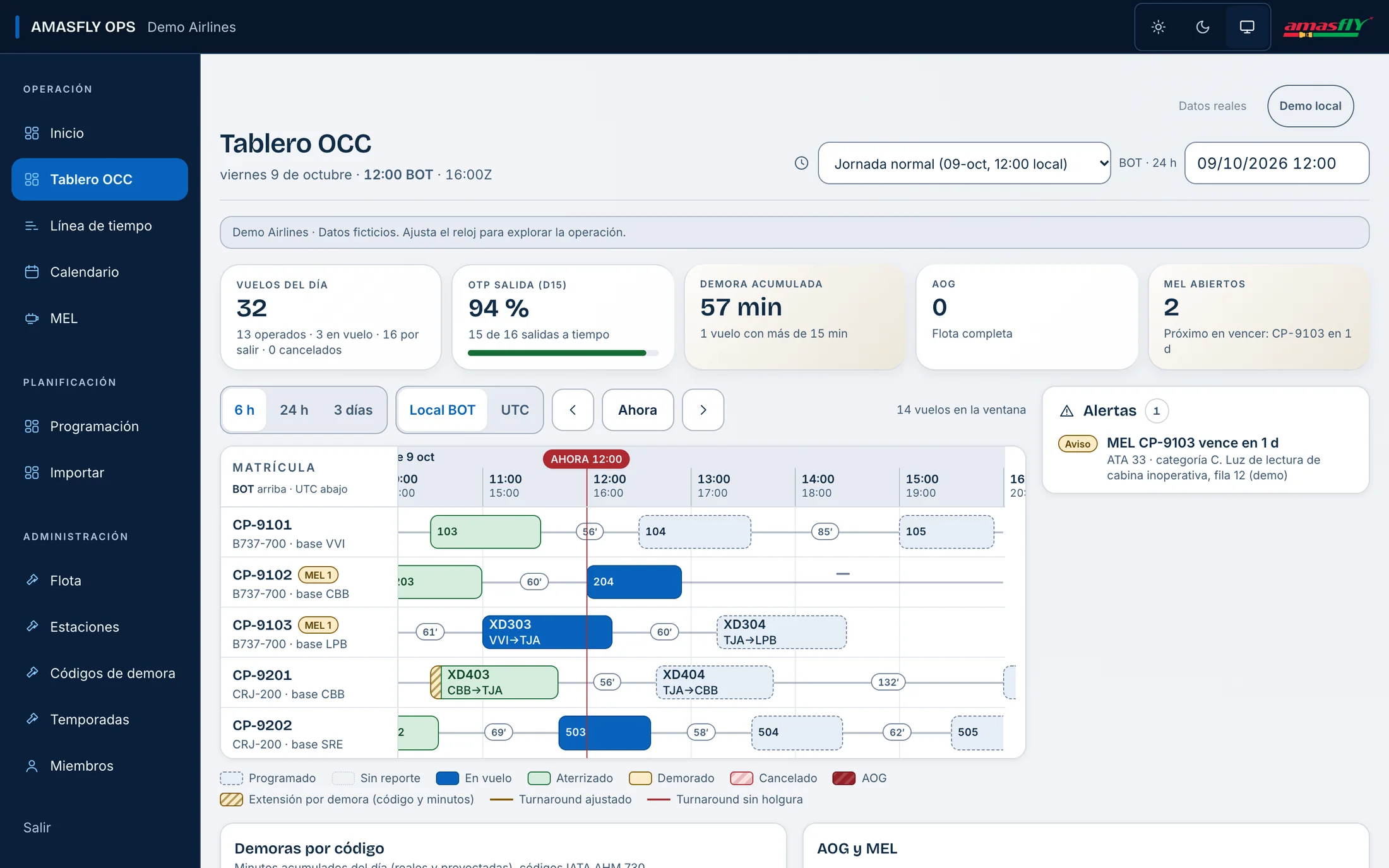
AMASFLY OPS OCC board: indicators of the day, flight timeline by registration and alerts for Demo Airlines.

When something breaks, who sees which rotations are affected?

The schedule lives in a spreadsheet, movements arrive in loose messages and maintenance keeps its own list. OPS puts everything on the same timeline.

  • What was planned and what happened, together

    OPS imports the schedule and compares it with what happens: OOOI, coded delays and aircraft changes stay on the same flight.

  • Alerts that are calculated, not remembered

    The server detects a minimum connection that is not met, a rotation broken by a delay, an AOG with flights about to depart and an MEL about to expire.

  • Every change, with its trail

    Every edit to a flight is kept in an audit history that nobody rewrites.

Key features

OCC board and timeline by registration

Each row is an aircraft and each block a flight, with its turnarounds and stations. The indicators of the day show flights, on-time departures (OTP), accumulated delay, AOG and open MEL, and refresh on their own every 15 seconds.
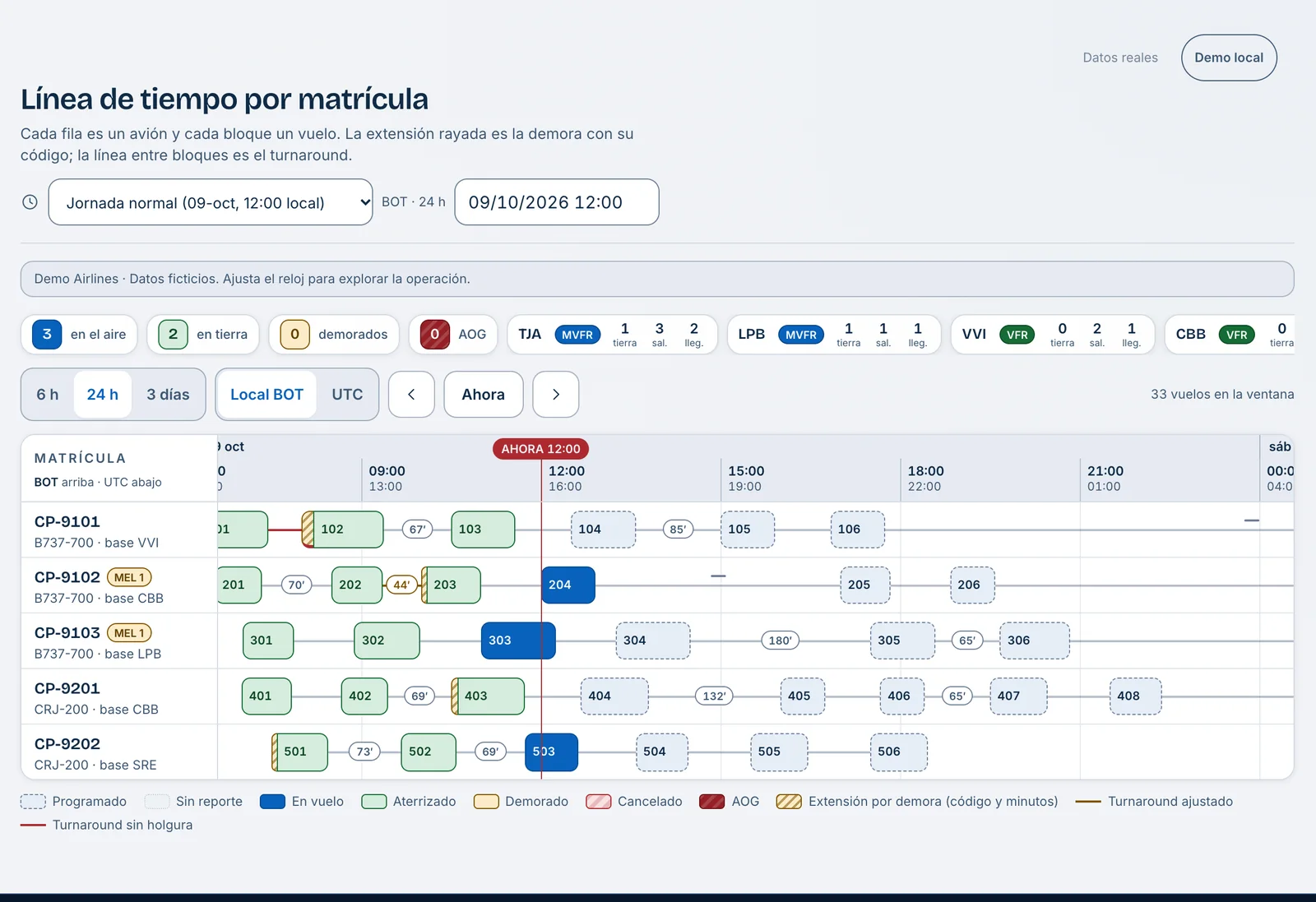
24-hour timeline by registration in AMASFLY OPS, with flights, turnarounds and stations.
Timeline by registration, sample scenario.

AOG, MEL and rotation alerts

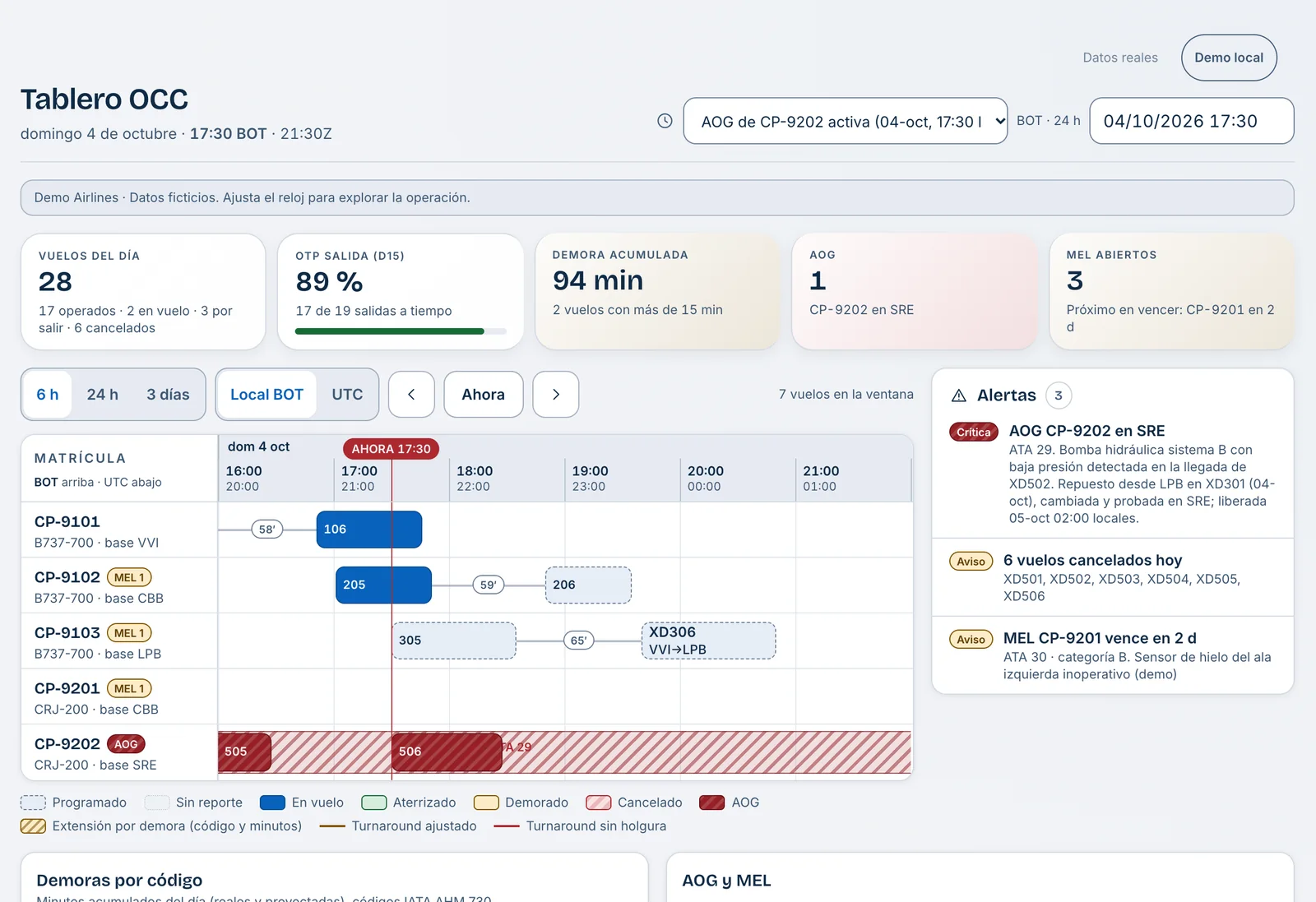
Declare an AOG with its ATA chapter and description and it appears as an interval on the board. MEL items carry a category and an expiry, with an amber light at 24 hours and red on expiry. Alerts show in the board panel.

AMASFLY OPS OCC board with an active AOG on registration CP-9202 and its alerts.
Board with an active AOG, sample scenario.

METAR and TAF weather by station

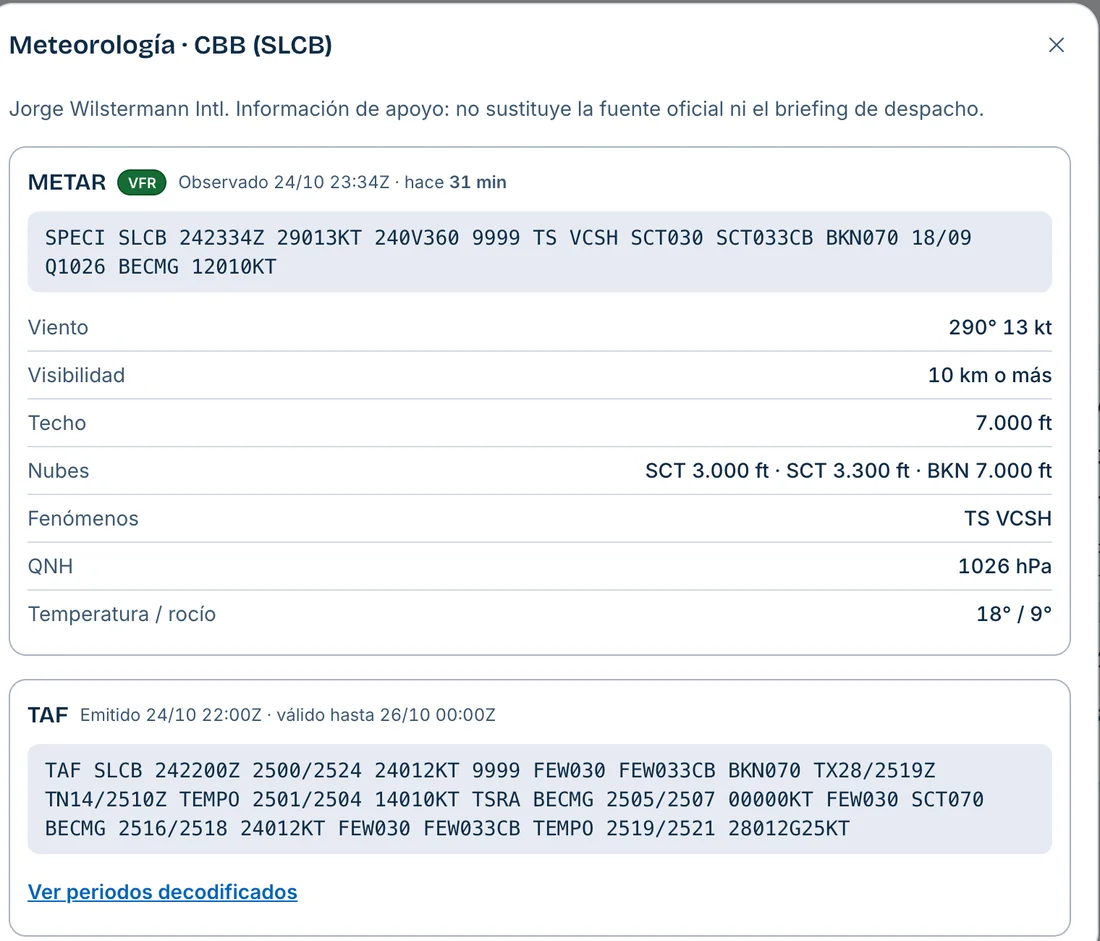
It reads the METAR and TAF of each station from the public source aviationweather.gov, classifies the category from VFR to LIFR and warns when the destination will be IFR or LIFR. It is supporting information: it does not replace the official source or the dispatch briefing.

AMASFLY OPS weather window with the METAR and TAF of station SLCB.
Real METAR and TAF for station SLCB, taken from the public source on the date of the capture.

Seasonal scheduling and calendar

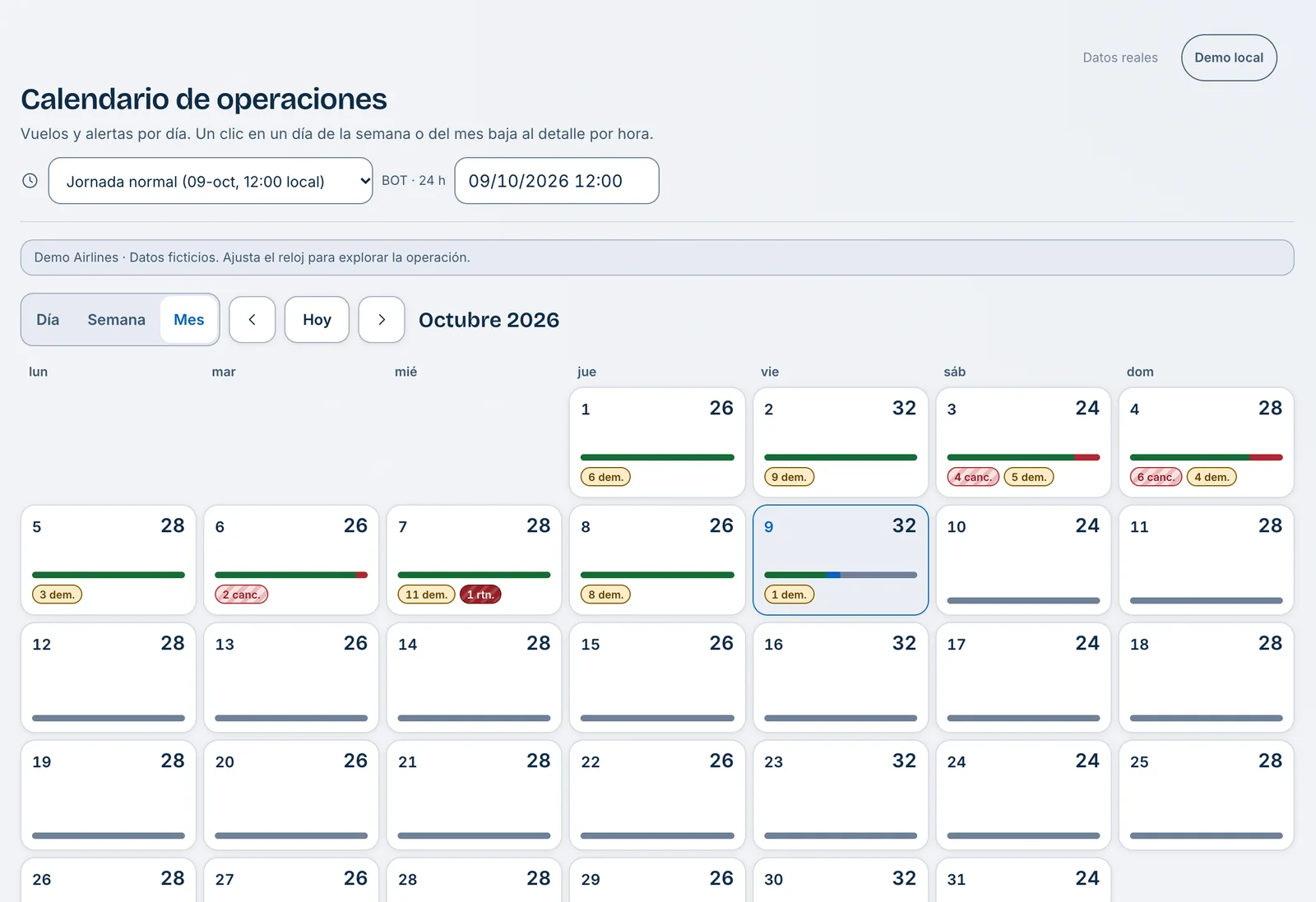
Import schedules in SSIM format (chapter 7) or CSV in two steps: you preview, then confirm. It generates the flights by date and the calendar shows the movements and alerts of each day.

AMASFLY OPS operations calendar with the flights and alerts of each day of the month.
Operations calendar, sample scenario.

How it connects to the rest of the suite

OPS shares its account, flights and alerts with other products. Each connection is switched on per organization, as agreed with your airline.

  • SMSOPS

    One account with the SMS

    You sign in to OPS with your SMS account, through single sign-on.

    Available
  • OPSSMS

    From an operational event to a report

    From a flight, OPS prepares a draft safety report that the person completes and sends to the SMS.

    Available
  • OPSSMS

    Exposure for the SMS indicators

    OPS calculates departures, cycles and hours every month, and the SMS syncs them daily.

    Available
  • OPSCrew

    The same flights for the crews

    Crew reads the flights and catalogs from OPS: it is the same product and the same database.

    Available
  • SELECTOPS

    From approved candidate to crew record

    The step from SELECT to OPS and Crew is built and will be switched on as each airline agrees.

    Coming soon

Each connection is switched on per organization, as agreed with your airline.

Security and data

OPS runs on the Cloudflare cloud: you use it from the browser, with nothing to install.

  • Each organization, kept apart

    Every query is scoped to the organization of the membership, never to a value sent by the browser. Automated tests check isolation between organizations.

  • Access by invitation

    There is no public sign-up: an administrator invites with a single-use link that expires in 72 hours and verifies the email. Passwords need at least 12 characters and sign-in limits attempts per email and per IP.

  • Clear roles

    Administrator, controller, scheduler, maintenance and management (read-only). Deactivating a person ends their sessions.

  • A log nobody edits

    The audit history is immutable by database design, and operational notes and events can only be added.

Try it with Demo Airlines

Demo Airlines is a fictitious airline that lives in production: five stations, five aircraft and sample flights. We show you OPS running with them.

Demo accounts are handed over in the meeting.

AMASFLY OPS

ops.amasfly.net

The Demo Airlines OCC board, with its fictitious fleet and schedule.

Guided access

Let’s talk about AMASFLY OPS.

Tell us how your airline operates and we will show you the product with Demo Airlines data. It is contracted per airline, tailored to your operation.

You can also write to info@amasfly.com or reach us on WhatsApp at +591 69374523.